Direct answer
Which views are available for image comparison?
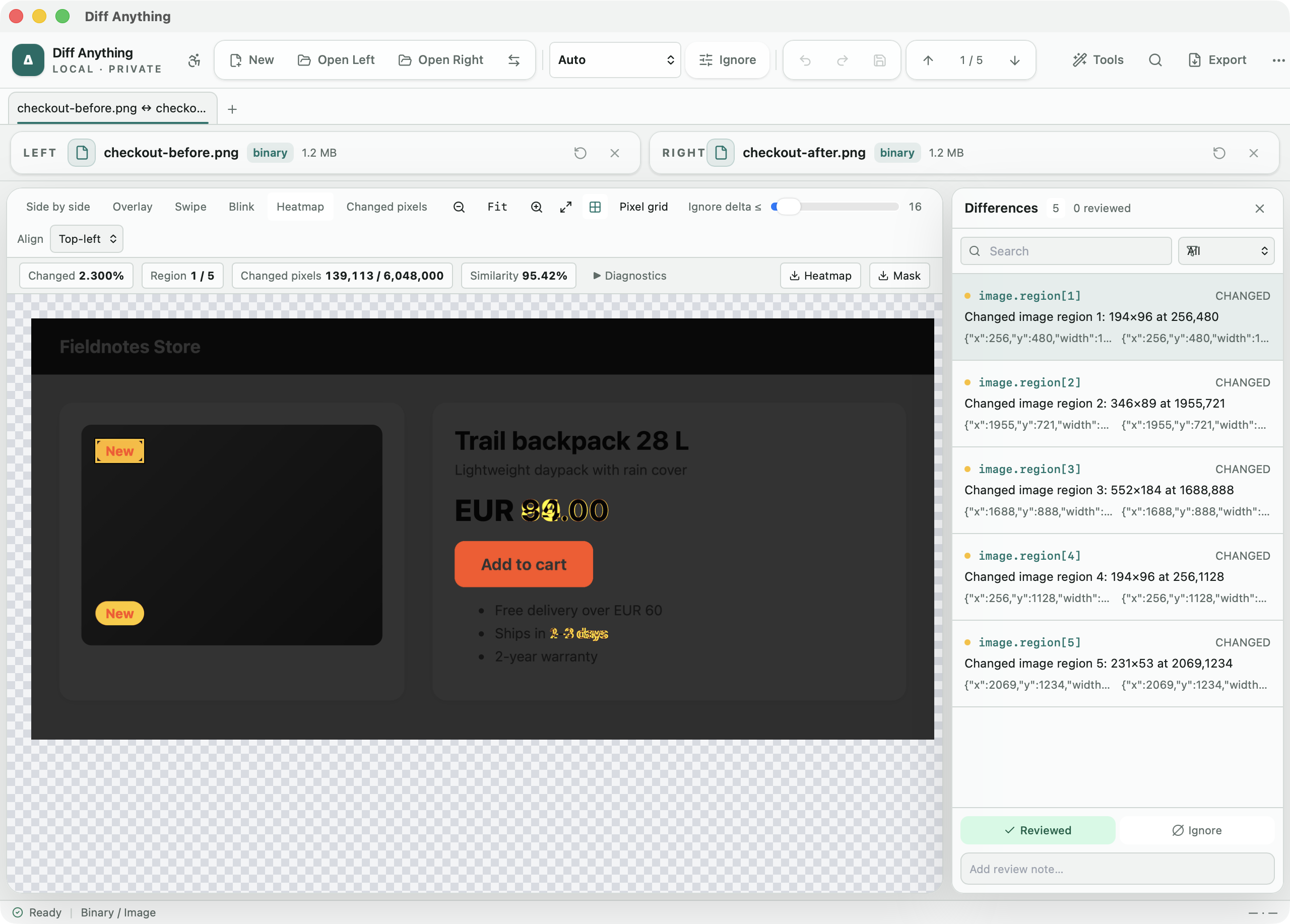
Diff Anything provides side-by-side, overlay, swipe, blink, heatmap, and changed-pixel views for PNG, JPEG, GIF, WebP, BMP, TIFF, Photoshop, SVG, HEIC, AVIF, camera RAW, and other formats. It aligns dimension changes on a shared canvas, leaves ignore regions out of every measurement, moves the updated image by an offset you set or find with Align automatically, lists both images' metadata side by side, and reports changed pixels, similarity, error measurements, maximum channel change, and the bounds of the changed area.
Best for
Where this workflow fits.
- Reviewing UI captures and generated graphics between builds
- Finding subtle pixel changes that are hard to spot side by side
- Comparing private or unreleased artwork without an upload
No accounts, cloud comparison service, analytics, or telemetry.
Relevant capabilities
What Diff Anything brings to the job.
Practical workflow
From setup to a reviewed result.
Open both images
Choose two local image files; orientation-aware decoding prepares them for the same pixel coordinate system.
Choose a visual view
Start side by side, then use overlay, swipe, blink, heatmap, or changed pixels for the question at hand.
Tune the inspection
Use fit or true-pixel zoom, the transparency grid, and a 0–255 threshold to separate meaningful changes from tiny channel variation.
Read the measurements
Review changed pixels, similarity, mean and RMS error, maximum channel delta, dimensions, and changed bounds.
Useful in practice
Direct answers
Questions about image diff tool.
Which views are available for image comparison?
Diff Anything provides side-by-side, overlay, swipe, blink, heatmap, and changed-pixel views for PNG, JPEG, GIF, WebP, BMP, TIFF, Photoshop, SVG, HEIC, AVIF, camera RAW, and other formats. It aligns dimension changes on a shared canvas, leaves ignore regions out of every measurement, moves the updated image by an offset you set or find with Align automatically, lists both images' metadata side by side, and reports changed pixels, similarity, error measurements, maximum channel change, and the bounds of the changed area.
Which image-diff views are available?
Side by side, overlay, swipe, blink, heatmap, and changed-pixel views are available in the same workspace.
Can Diff Anything compare images with different dimensions?
Yes. It aligns them at the top left on a shared transparent canvas, so the added or missing area remains part of the pixel comparison.
What image-diff measurements are reported?
The workspace reports changed-pixel count and ratio, similarity, mean error, root-mean-square error, maximum channel delta, source dimensions, and the bounds of the changed area.
Can I ignore part of a screenshot, such as a clock?
Yes. Draw an ignore region over it, or type its coordinates. Pixels inside a region count in no measurement.
Which image formats are supported?
PNG, JPEG, GIF, WebP, BMP, TIFF, ICO, TGA, QOI, PNM, OpenEXR, Radiance HDR, Photoshop (PSD and PSB, by their composite image), and SVG, rendered when you choose Compare rendered. HEIC, AVIF, and camera RAW are decoded by the operating system; on Windows they need the matching image extensions from the Microsoft Store.
Are the images uploaded?
No. Image decoding, visual views, thresholds, and measurements run locally in Diff Anything.
Go deeper
Review cross-format spreadsheet values, release trees, documents, and visual assets with purpose-built navigation, safety checks, and rollback.
Read Compare folders, spreadsheets, documents, and imagesFree & Pro: what’s included
Available on the Mac App Store and Microsoft Store. Free desktop use lets you try every comparison engine for files up to 5 MiB per side and 10 new comparison sessions per local day; collection previews show the first 100 items, binary comparisons the first 100 byte differences, and PDF previews the first 3 pages. Plain text, JSON, and Jupyter notebook comparison are complete, and opening files from Finder or File Explorer, diffanything:// links, and AppleScript are free. The free CLI supports text, JSON, and notebooks, and the command-line helper that brings the CLI to the Mac App Store version is a free download that uses the Pro purchase made in the app. A one-time Pro purchase removes the preview and session limits and unlocks larger sources within technical limits, saved profiles and history, saving folder snapshots, report export and printing, JSON Patch export, applying patches, three-way merge and conflict resolution, the Git merge driver and merge tool, folder synchronization, batch manifests, every CLI mode, and, on Windows, trusted preprocessors.